mirror of
https://github.com/morgan9e/macos-stats
synced 2026-04-14 00:04:15 +09:00

Stats
Simple macOS system monitor in your menu bar
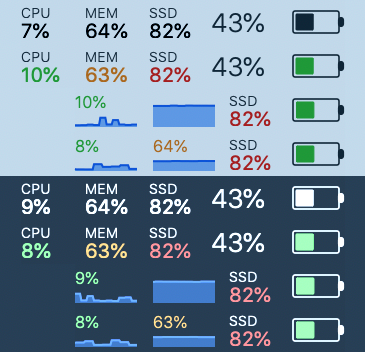
Features
Stats is a application which allows you to monitor your macOS system.
- CPU Usage
- Memory Usage
- Disk utilization
- Battery level
- Network usage
- Black theme compatible
Installation
You can download latest version here.
Modules
| Name | Available widgets | Description |
|---|---|---|
| CPU | Percentage / Chart / Chart with value | Shows CPU usage |
| Memory | Percentage / Chart / Chart with value | Shows RAM usage |
| Disk | Percentage | Shows disk utilization |
| Battery | Graphic / Percentage | Shows battery level and charging status |
| Newtork | Dots / Upload/Download traffic | Shows network activity |
Compatibility
| macOS | Compatible |
|---|---|
| 10.13.6 (High Sierra) | true |
| 10.14.1 (Mojave) | true |
Todo
- Battery percentage
- Create new logo (IconArchive)
- Window with preferences
- Save last modules values
- Colors toggle for each module
- temperature module
- battery module
- move to module system (CPU, RAM, DISK)
- network module
- save settings
- OTA updates
- charts
- autostart on boot
What's new
v1.2.3
- new icon
- small code refactoring
- changed font style name of the indicator in the Chart/Chart with value
- added dock icon visibility to preferences
- moved color and label preference from global to local (now each module can be configurated separately)
- now check for updates on start can be disabled in preferences
- fixed few bugs
v1.2.2
- fully automated build and sign app process
- fixed update and about visibility window in dark mode
- added name of the indicators in the Chart/Chart with value
- added check for new version on start
- removed charts and charts with value to Disk module
- now module submenu is disabled if module is disabled
- fixed bug when network module stop working after turn on/of
- fixed few bugs
v1.2.1
- added charts and charts with value to Disk module
- fixed bug when Chart with value does not shows
v1.2.0
- added network module
- added Check for updates window
- fixed few bugs
v1.1.0
- added battery module
- added chart widget for CPU and Memory
- added About Stats window
v1.0.0
- first release